v4.4.0 · Polish & Poise

Track every peso.
Privately.

A jungle-green personal finance tracker for Android, iPhone and the web. Budgets, wallets, receipt scanning and an on-device advisor — no account, no cloud, no tracking.

  • ₱0Android APK
  • ₱0iPhone PWA
  • 22Banks built in
  • MITOpen source
⚙
Expo SDK 58React Native · TypeScript
📱
Android · iOS · WebOne codebase, three platforms
🔒
On-device onlyAsyncStorage · localStorage
🧪
48 assertionsLogic test suite, zero deps
Features

Everything you need to stay on top of money.

A complete personal finance toolkit in one quiet, focused app — built for the Philippine wallet first, then the world.

🫧

Glassmorphism, done tastefully

Every card is a frosted pane: translucent fill, hairline edge, soft top sheen — real depth from aurora orbs behind it. Dark mode included, cross-fading live. And since v4.4.0, motion stays calm everywhere — presses sink, sections rise, nothing bounces.

👛

22 banks & e-wallets, built in

A full catalog of Philippine banks and e-wallets ships inside the app. Pick a brand from the picker, type the balance — logo, name and color fill in automatically.

🔔

Purchase detection

Paste any e-wallet or bank SMS and Aiserie reads the amount and direction on-device, then pre-fills a transaction. No message access, no monitoring.

🧾

Receipt scanning

On-device OCR (Google ML Kit) reads the total from a photo of a receipt and defaults to the Groceries category. Nothing is uploaded.

🧠

Finance advisor

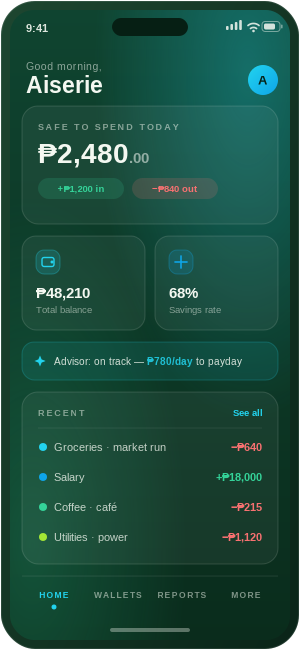
Safe-to-spend per day, month-end projections, savings rate, category concentration warnings, momentum and recurring-bill reminders.

✅

Things-to-do

Money chores with springy check-offs, star pinning and a progress ring so the small admin never piles up.

🐷

Savings goals

Piggy banks with progress, contributions and withdrawals — watch the trip, the gadget, the emergency fund fill up.

📊

Visual reports

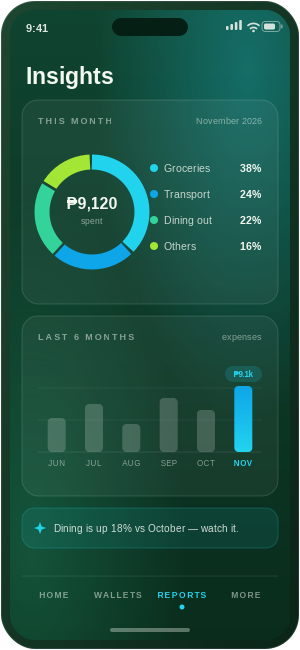
Category donut chart, 6-month income/expense bars, month-by-month navigation. Export to CSV and PDF for any period.

🔁

Recurring & budgets

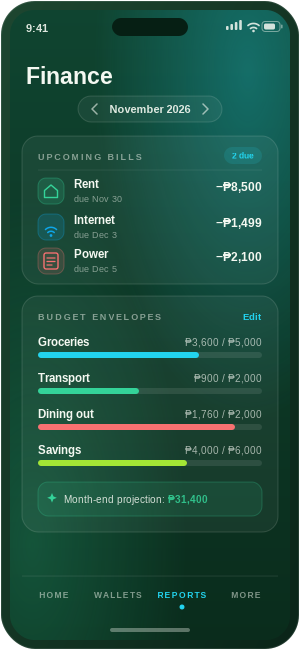
Daily/weekly/monthly/yearly schedules with deterministic ids so re-runs never duplicate money. Budget envelopes nudge you at 50/75/90/100%.

Wallets

One tap per account. The brand fills in.

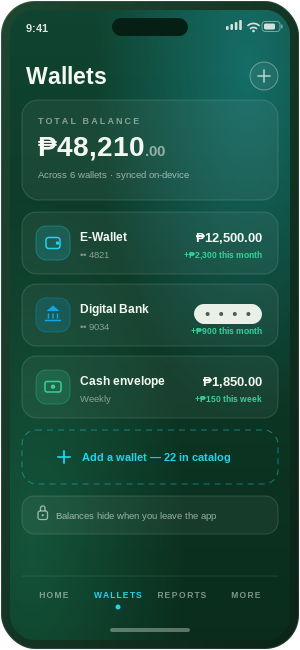
The picker ships with twenty-two Philippine banks and e-wallets — choose yours and the brand fills itself in. We keep every name and logo off this page: trademarks belong to their owners.

22 banks & e-wallets
ship built in
  • ✓ Brand-correct logo, name and color — auto-filled from the picker
  • ✓ Unlimited custom wallets for everything the catalog misses
  • ✓ Balances vanish behind the privacy curtain when you leave the app
  • ✓ One tap from the picker to a live, running balance
  • ✓ Every logo re-cut to one uniform squircle in v4.4.0 — same optical weight everywhere

How brand tiles appear behind the privacy curtain.

On-device OCR

Snap a receipt.
Get a transaction.

Point the camera at any grocery or store receipt. Google ML Kit reads the total on your phone — nothing is uploaded — and Aiserie creates a Groceries transaction you can confirm in one tap.

  • ✓ Camera permission only, nothing else
  • ✓ Web/PWA falls back to manual entry
  • ✓ Loads lazily — never bundled into web build
Privacy shield

Your money stays
on your phone.

No account. No cloud. No tracking. Balances hide behind a branded curtain whenever you leave the app and lift on return, under an optional PIN pad. The only network call is a public GitHub release check for update nudges.

  • ✓ AsyncStorage (native) & localStorage (web)
  • ✓ Backup files written locally — never uploaded
  • ✓ Import validates & sanitizes before writing
App preview

Real screens. Real pesos.

Home, wallets, finance and insights — the four screens you'll actually live in, sharp down to the peso sign.

Aiserie Tracks home screen — safe-to-spend card, total balance, advisor tip and recent transactions
Home — safe to spend, live
Wallets screen with total balance, wallet cards and the privacy curtain hiding one balance
Wallets — every balance, one screen
Finance screen with upcoming bills and envelope budgets with progress bars
Finance — bills & envelopes
Insights screen with a spending donut chart and six-month expense bars
Insights — spending, day by day
Get the app

Free, forever. Install in under a minute.

No Play Store needed for Android, no Apple Developer fee for iPhone. Two paths, both free, both update automatically.

Android

Signed APK from GitHub Releases. Updating keeps every record; existing installs see the update nudge automatically.

  1. Tap the button below — the APK downloads directly.
  2. Open the downloaded AiserieTracks-v4.4.0.apk.
  3. Allow "install unknown apps" for your browser.
  4. Install. Done — your data is yours.
Download APK — one click ↓

iPhone & iPad

Installable PWA via Safari → Add to Home Screen. Full-screen with its own icon and splash — no App Store, no fee.

  1. Open the live PWA link in Safari.
  2. Tap Share □↑ → Add to Home Screen.
  3. Add. Aiserie launches full-screen.
  4. Updates arrive automatically on every push.
Open the PWA →
FAQ

Questions, answered.

Is Aiserie Tracks really free?

Yes. Android is a signed APK from GitHub Releases. iPhone is an installable PWA. No ads, no account, no in-app purchases. The source is MIT licensed.

Where is my data stored?

Entirely on your device — AsyncStorage on native, localStorage on web. The only network call is a public GitHub release check for update nudges. Backup files are written locally or shared via the system share sheet; nothing is uploaded.

Does receipt scanning send photos anywhere?

No. OCR uses Google ML Kit, fully on-device. The module is loaded lazily and never bundled into the web build. On web and in Expo Go, the app falls back to manual entry instead of crashing.

Can I switch currencies?

The default is PHP, but you can switch to USD, EUR, GBP, JPY, SGD and more in Settings. Reports and exports reflect your choice.

What happens if I update the app?

Updating keeps every record. On boot the app checks GitHub Releases; if a newer version exists, a glass "Update available" card appears with a deep link to the latest release. There's a 3-day snooze and a manual check in Settings.

How do backups work?

One JSON file with everything. Import validates structure and sanitizes every entry (drops corrupt rows, dedupes ids, clamps values) before writing — then merges without duplicating, or replaces everything after a double confirmation.

Is the app crash-proof?

Malformed records are repaired at load or paused, never fatal. A root error boundary swaps any render bug for a branded recovery screen. Every money counter runs on disjoint animation-driver graphs.

The origin

Made for Aiserie, first.

This website wasn't built for a launch. It was built first for Aiserie (Chloe) — the developer's girlfriend, and the name behind Aiserie Tracks. One person, one gift, before it was ever a product.

She got the first build, the first frost pane, the first jungle-green glow. The site grew after that — but her name is still where it starts.

— built with love, for Chloe first

Quiet money. Yours.

Install Aiserie Tracks in under a minute — Android, iPhone or the web. No account, ever.